COMPLETE TRADING GUIDE
How to Trade on Photon
Photon is a browser terminal built for speed on Solana. Memescope screens new launches, limit and DCA orders automate entries and exits, Smart-MEV protection decides how your transaction routes, and the S1, S2 and S3 presets store the settings you would otherwise be editing under time pressure.
This hub covers what Photon documents, and only what it documents. New to the platform? Start with Getting Started for the wallet and the one-time private key, then come back here.
Trading Hub
Updated August 2026
What Trading Features Does Photon Offer?
Per Photon's official documentation, the Solana terminal ships Memescope, a live pairs feed, a trending page, per-token and per-pair pages, a My Holdings view, limit orders, DCA orders, Smart-MEV Protection, multi-wallet support and a settings layer covering presets, priority fees, Jito bribes, slippage and auto-buy/auto-sell triggers. Everything on this page comes from that set.
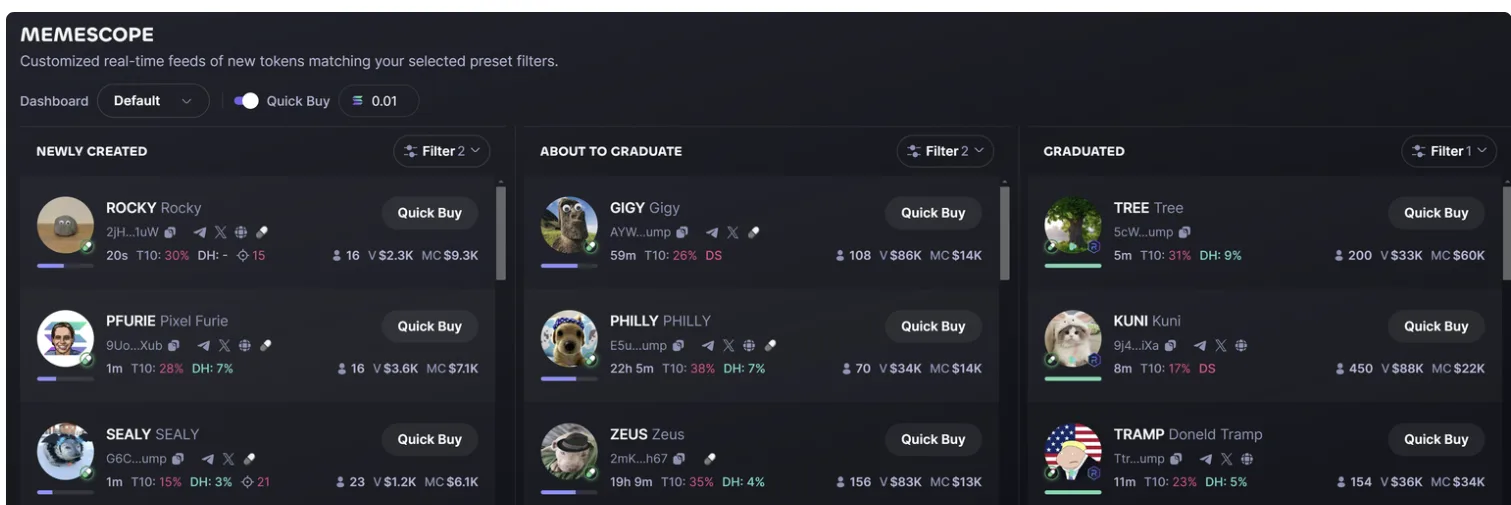
Memescope is the piece people actually switch terminals for. It is a customizable dashboard of Pump.fun and Moonshot launches with filters on top-10 holder percentage, whether socials are attached, bonding-curve progress, holder count, developer holding percentage, liquidity, volume, market cap, and buy or sell activity. Hover-to-pause stops a column from scrolling while you read it, and every row carries a quick-buy button wired to your active preset. In practice, the holder-concentration and dev-holding filters do most of the work: they are the cheapest way to drop obvious rug setups out of the feed before you look at a chart.
What Photon Does Not Have
Worth stating plainly, because a lot of content about Photon gets this wrong. There is no Telegram bot: Photon is a web app, and nothing in its entire documentation set mentions Telegram. There is no "Discover" page, no named sniper module, no documented migration-sniping mechanic, no wallet tracking of other people's wallets, no copy trading and no named PnL tracker. Multi-Wallet covers your own wallets only. If a review promises you one of those on Photon, it is describing a different product or repeating another review that did.
Trading at a Glance
Memescope
Filterable launch feed
Limit + DCA
Automated entries and exits
5 wallets
Per account, archivable
1% / 1%
Photon fee, buy and sell
Limit Orders, DCA Orders and Automation
Photon's limit orders are more flexible than the name suggests. You can set a buy on a percentage drop, on an exact market cap, or by dragging a target line on the chart, and the same surface handles stop loss and take profit. Orders expire after 24, 48 or 72 hours, each one can carry its own priority fee and bribe, and filling one side to 100% allocation automatically cancels its paired order, so a take-profit that fills does not leave a stop hanging behind it.
DCA orders place recurring buys or sells sized in SOL or as a percentage, on an interval measured in minutes or hours, for a set total number of orders. You can bound them to a market-cap range, and they use the same expiry options. Our limit orders and DCA guide walks through every field with Photon's own screenshots.
Separately, the presets carry auto-buy and auto-sell triggers tied to market-cap percentage change. These are per-preset, which is the important detail: switching preset switches your automation along with your fees and slippage. Check which preset is active before you use quick-buy from Memescope.
MEV Protection, Priority Fees and What Photon Actually Charges
Smart-MEV Protection routes your transaction based on the size of your bribe. In Fast Mode, bribes below 0.001 SOL go directly to Jito and anything larger routes through Bloxroute. Secure Mode applies the same logic at a 0.002 SOL threshold. A Default Speed setting and an Auto Speed setting sit alongside them, the latter adjusting your priority fee and bribe from recently successful transactions rather than a fixed number.
Keep the accounting straight, because most Photon content does not. The priority fee goes to Solana validators. The bribe goes to Jito validators. You set both, they come out of your SOL balance, and Photon receives neither. Photon's own charge is a separate flat 1% on every buy and every sell, quoted verbatim in its fee documentation as "1% of the initial token used for every buy and sell transaction." Wallet-to-wallet transfers are not charged a Photon fee.
That distinction matters when you size a position. On a fresh Pump.fun launch, a round trip can stack Photon's 2% (1% each way), PumpSwap's own fee of up to 1.25% tapering by market cap, your priority fee, your bribe, and slippage. The fees page works through the arithmetic, and the comparisons show how that stacks against terminals that publish discount tiers.
Try the Settings Before You Size Up
Configure S1, S2 and S3 with your own slippage, priority fee and bribe, then trade small until the numbers behave the way you expect. Photon takes 1% on the way in and 1% on the way out either way.
Open PhotonKey Trading Features
Memescope
The flagship. A filterable live feed of Pump.fun and Moonshot launches, screened by holder concentration, dev holding, bonding-curve progress, liquidity and volume.
Memescope Guide →Limit Orders
Buy a dip by percentage, by exact market cap, or from a line on the chart. Stop loss and take profit, 24/48/72-hour expiries, paired orders that auto-cancel.
Limit Orders Guide →DCA Orders
Recurring buys or sells by SOL amount or percentage, on a set interval and order count, optionally bounded to a market-cap range.
DCA Guide →Smart-MEV Protection
Fast Mode and Secure Mode change how your bribe routes between Jito and Bloxroute, with Auto Speed tuning your fee from recent successful transactions.
Trading Hub →Multi-Wallet
Up to five wallets on one account, with archiving, split deposits across wallets, per-wallet quick trading and a Moonpay on-ramp.
Getting Started →The 1% Fee
Flat, on every buy and every sell, with no tiers and no published referral discount. It is the single biggest input into whether Photon suits your trading frequency.
Fees Explained →Frequently Asked Questions
What is Memescope on Photon?
Memescope is Photon's flagship feature: a customizable dashboard of newly launched Pump.fun and Moonshot tokens. You can filter the feed by top-10 holder percentage, whether socials are attached, bonding-curve progress, holder count, developer holding percentage, liquidity, volume, market cap, and buy or sell activity. Hovering pauses the feed so a fast-moving column stops scrolling under your cursor, and each row carries a quick-buy button.
What order types does Photon support?
Market buys and sells, limit orders, and DCA orders. Limit orders can buy a dip by percentage drop, by an exact market cap, or by dragging a target line on the chart, and they cover stop loss and take profit with 24, 48 or 72-hour expirations. Filling one side to 100% allocation auto-cancels its paired order. DCA orders place recurring buys or sells by SOL amount or percentage, on a minute or hour interval, with a total order count, an optional market-cap range, and the same expiry options. Each order can carry its own priority fee and bribe.
What are the S1, S2 and S3 presets?
Three saved trading profiles, each holding its own MEV protection mode, priority fee, Jito bribe and slippage tolerance. The names really are S1, S2 and S3; the "degen / normal / custom" labels that appear on some sites do not exist in Photon's documentation. Presets also carry the auto-buy and auto-sell triggers, which fire on market-cap percentage moves.
How does Photon's Smart-MEV Protection work?
It routes your transaction differently depending on the size of your bribe. In Fast Mode, bribes below 0.001 SOL go straight to Jito and larger ones route through Bloxroute. Secure Mode applies the same logic at a 0.002 SOL threshold. Alongside those sit a Default Speed setting and an Auto Speed setting, which adjusts your priority fee and bribe based on recently successful transactions.
What is the difference between a priority fee and a bribe on Photon?
A priority fee is paid to Solana validators to get your transaction confirmed sooner. A bribe is paid to Jito validators for block-space priority and MEV protection. Both are set by you in Settings, both come out of your SOL balance, and neither goes to Photon. Photon's own cut is a separate flat 1% on every buy and sell. Competitor content routinely blurs these together, which makes Photon look either cheaper or more expensive than it is.
How many wallets can I use on Photon?
Up to five active wallets per account. You can archive and unarchive them, split a single deposit across several at once, and run quick buys and sells per wallet. There is also a Moonpay on-ramp for funding directly.
Does Photon have copy trading or wallet tracking?
Not according to its documentation. Photon's Multi-Wallet feature covers your own wallets, up to five of them, and nothing in the docs describes tracking other people's wallets, copy trading, a named sniper module, or a PnL tracker. Several third-party reviews attribute those features to Photon anyway. Memescope's developer-holding and top-10-holder filters cover part of what people mean by "bundle detection," but only part of it.
All Trading Guides
Photon Limit Orders and DCA: How to Set Them Up (2026)
How to set Photon limit orders and DCA orders: buy dip, stop loss and take profit triggers, DCA fields, the 72-hour expiry cap, and what each fill costs.
Photon Memescope: What Every Filter Means (2026)
Every Photon Memescope filter explained: what top-10 holder share, dev holding and bonding curve progress tell you, plus three filter setups you can copy.
Cite this page
These figures are free to quote. Copy the citation or the link below.
Plain-text citation
PhotonGuides. "How to Trade on Photon." Published August 6, 2026, updated September 8, 2026. https://photonguides.com/guides/tradingHTML link
<a href="https://photonguides.com/guides/trading">How to Trade on Photon, PhotonGuides</a>Methodology and reuse
The order types, Memescope filters, Smart-MEV routing thresholds, preset names and wallet limit on this page are read from Photon's own Trading documentation, and the flat 1% buy and sell rate is quoted from its fee page. Nothing here is a Photon statement about itself beyond what those documents say. They were read from the official Photon Trading documentation on and re-verified against the live app. Exchanges change their schedules, so treat any figure older than that date as needing a fresh check. The date above is the one to compare against, and our methodology page sets out how every figure on this site is derived.
You may republish these figures with attribution and a link to https://photonguides.com/guides/trading.
Ready to Trade?
No KYC and no email. Photon builds a Solana wallet in the browser, shows you the private key once, and charges a flat 1% on every buy and every sell.
Open Photon